On this page
自動コールバックリクエスト
自動コールバックリクエストは、すべてのエージェントが通話中の場合に、顧客がキューで待つ代わりにコールバックをリクエストして通話を終了できるオプションを提供したいときに便利な機能です。
設定(Configuration)> 通話(Call)> 番号(Numbers)の電話番号設定にある既存のIVRに、以下のコマンドを追加するだけです。
- callback顧客がcallbackコマンドを含むIVRオプションを選択すると、顧客側の通話は終了し、新しいコールバックリクエストが自動的にキューに追加されます。
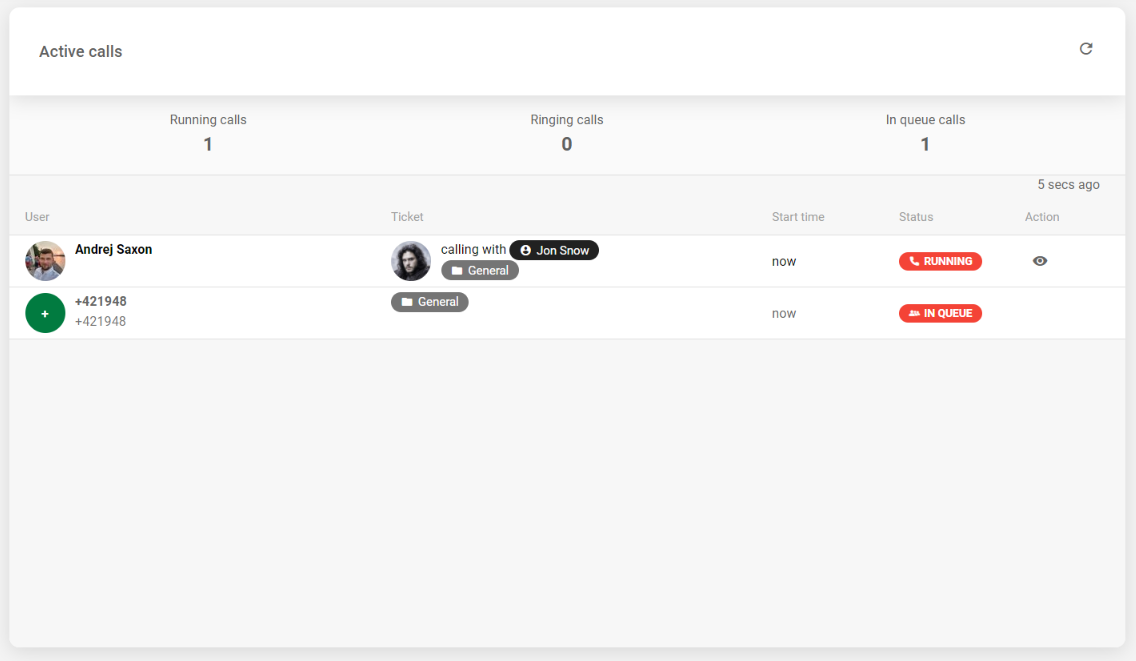
いずれかのエージェントが通話可能になると、コールバックリクエストが通常の着信リクエストと同様にエージェントのパネルで着信を開始します。 エージェントがリクエストを承認して初めて顧客の番号がダイヤルされ、エージェントが手動で発信したかのように通話が進みます。
IVR callbackコマンドの例
playコマンド内のファイルへのリンクは有効なものではなく、あくまで例として記載しています。実際のリンクは、独自の録音を追加・挿入した際に自動的に生成されます。
callbackコマンドはIVRのオフラインセクションでは使用しないでください。
直接コールバックをリクエストする場合
online:
  - play: https://mycompany.ladesk.com/scripts/file.php?view=Y&file=welcome-message.mp3
  - choice:
      1:
        name: Support
        play: https://mycompany.ladesk.com/scripts/file.php?view=Y&file=press-one-to-start-call.mp3
        do:
          - ring
      2:
        name: Request callback
        play: https://mycompany.ladesk.com/scripts/file.php?view=Y&file=press_2_to_request_callback.mp3
        do:
          - callback
offline:
  - play: https://mycompany.ladesk.com/scripts/file.php?view=Y&file=leave-a-voicemail.mp3
  - voicemail
queue:
  - play: https://mycompany.ladesk.com/scripts/file.php?view=Y&file=next-in-queue.mp3
キューで待機中にコールバックをリクエストする場合
online:
  - play: https://mycompany.ladesk.com/scripts/file.php?view=Y&file=connect-first-available-agent.mp3
  - ring
offline:
  - play: https://mycompany.ladesk.com/scripts/file.php?view=Y&file=we-are-currently-not-available-check-website.mp3
queue:
  - play: https://mycompany.ladesk.com/scripts/file.php?view=Y&file=next-in-queue.mp3
  - choice:
      0:
        name: Wait
        play: https://mycompany.ladesk.com/scripts/file.php?view=Y&file=hidden-waiting-music.mp3
        goto: queue
      1:
        name: Leave voicemail
        play: https://mycompany.ladesk.com/scripts/file.php?view=Y&file=press-one-to-leave-a-voicemail.mp3
        goto: voicemail
      2:
        name: Request callback
        play: https://mycompany.ladesk.com/scripts/file.php?view=Y&file=press_2_to_request_callback.mp3
        goto: callmeback
callmeback:
  - callback
voicemail:
  - play: https://mycompany.ladesk.com/scripts/file.php?view=Y&file=leave-a-voicemail.mp3
- voicemailIVR構造において、online・offline・queueの各セクションは必須です。IVR設定に関する一般的な情報はこちらの記事をご確認ください。

