JavaScriptで訪問者固有の値を設定する
これらの関数は、例えばECサイトやイントラネットにログインしている訪問者の情報(名前、メールアドレス、電話番号、カスタムフィールドの値など)をすでに把握しており、それを設定したい場合に便利です。ウィジェットの統合コードにこのJavaScript呼び出しを追加することで、Chats > Chats overview(チャット概要)のオンライン訪問者一覧に訪問者の名前が表示されるようになります。また、訪問者がチャットを開始したり、LiveAgentのお問い合わせフォームを開いたりした際に、詳細情報が自動入力されます。
サポートされているJavaScript関数:
//Set all customer data with one call
LiveAgent.setUserDetails(email, firstName, lastName, phone);

//Clear customer data with one call (available since ver. 5.17)
//Before ver. 5.17 such call left fields email, firstName, lastName, phone unchanged
LiveAgent.setUserDetails();

//Using value = "" or not specified value will clear specified key (available since ver. 5.17)
//Before ver. 5.17 such call left key field unchanged
//Set just specific customer value - supported keys: email, firstName, lastName, phone
LiveAgent.addUserDetail(key, value);

//Add custom field value to Contact (customer field has to be defined in your LiveAgent->Configuration->System->Contact fields)
LiveAgent.addContactField(key, value);

//Add custom field value to Ticket (ticket field has to be defined in your LiveAgent->Configuration->System->Ticket fields)
LiveAgent.addTicketField(key, value);

//Clear all customer data and all Contact and Ticket fields with one call - should use before new customer any set/add
//to remove all previous customer data (available since ver. 5.17)
LiveAgent.clearAllUserDetails();

//Set customer's actual location on the website into the conversation thread
LiveAgent.setVisitorLocation(URL);
一般的な使用方法として、ウィジェットが作成される前にウィジェット統合コード内で関数を呼び出します:
<script type="text/javascript">
(function(d, src, c) { var t=d.scripts[d.scripts.length - 1],s=d.createElement('script');s.id='la_x2s6df8d';s.async=true;s.src=src;s.onload=s.onreadystatechange=function(){var rs=this.readyState;if(rs&&(rs!='complete')&&(rs!='loaded')){return;}c(this);};t.parentElement.insertBefore(s,t.nextSibling);})(document,
'//localhost.lc/LiveAgent/LiveAgent/server/scripts/track.js',
function(e){
  LiveAgent.clearAllUserDetails();
  LiveAgent.setUserDetails('customer@email.com', 'First name', 'Last name', '00123987654');
  LiveAgent.addTicketField('orderid', 'ORD123456');
  LiveAgent.addContactField('customer_type', 'VIP');
  LiveAgent.createButton('70735e08', e);
});
</script>ヒント:LiveAgent.createButton(...) の行を省略することで、お問い合わせウィジェットを表示せずにトラッキングコードのみとして使用することもできます。Chats > Chats overview(チャット概要)画面ですべてのオンライン訪問者を確認でき、招待設定がされている場合は手動でチャットに招待することができます。
addTicketField 関数を使ってチケットのカスタムフィールドを設定するには、あらかじめ LiveAgent の Configuration -> System -> Ticket fields(設定 -> システム -> チケットフィールド)メニューでフィールドを定義しておく必要があります。
同様に、JavaScriptの addContactField 関数でコンタクトのカスタムフィールドを設定する前に、LiveAgent の Configuration -> System -> Contact fields(設定 -> システム -> コンタクトフィールド)メニューでフィールドを定義しておくことを忘れないでください。
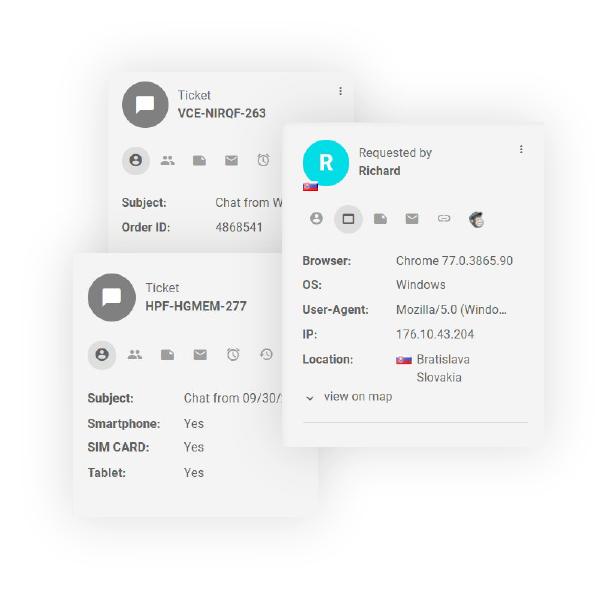
訪問者がコンタクトまたはチャットを開始すると、これらのカスタムパラメーターが作成されたチケット/チャットに渡され、エージェントはチケット詳細セクションで確認できるようになります。
お問い合わせフォームやチャット前フォームでこれらのカスタムパラメーター用のフィールドを直接使用している場合、addTicketField 関数で設定された値が訪問者に対して自動入力され、フォーム送信前に手動で変更することも可能です。
チケットのカスタムフィールドに渡された値を訪問者に見せたくない場合は、お問い合わせフォームやチャット前フォームでそれらのフィールドを直接使用しないようにしてください(チケットフィールド自体はLiveAgentで定義する必要があります)。こうすることで、チケットフィールドにはボタンコードで渡された値が引き続き保持されますが、その値が訪問者に表示されることはありません。

